

Website Tracking Setup for Small Businesses (GA4, Meta Pixel, TikTok Pixel, and Clarity)
Most small business websites collect visits but not answers. This guide shows how to track the pages, buttons, campaigns, and actions that actually generate enquiries.
Search intent
Informational - plan and improve a small-business website
Primary focus
website tracking setup for small business
Built for
Teams that need clearer website decisions before they spend.

Academy article
Victorious
Founder, Web Growth
Published
2026-02-26
Reviewed
2026-07-13
Best next move
Translate the strategy into page structure, offer hierarchy, proof placement, and clean conversion flow.
See Landing Page Service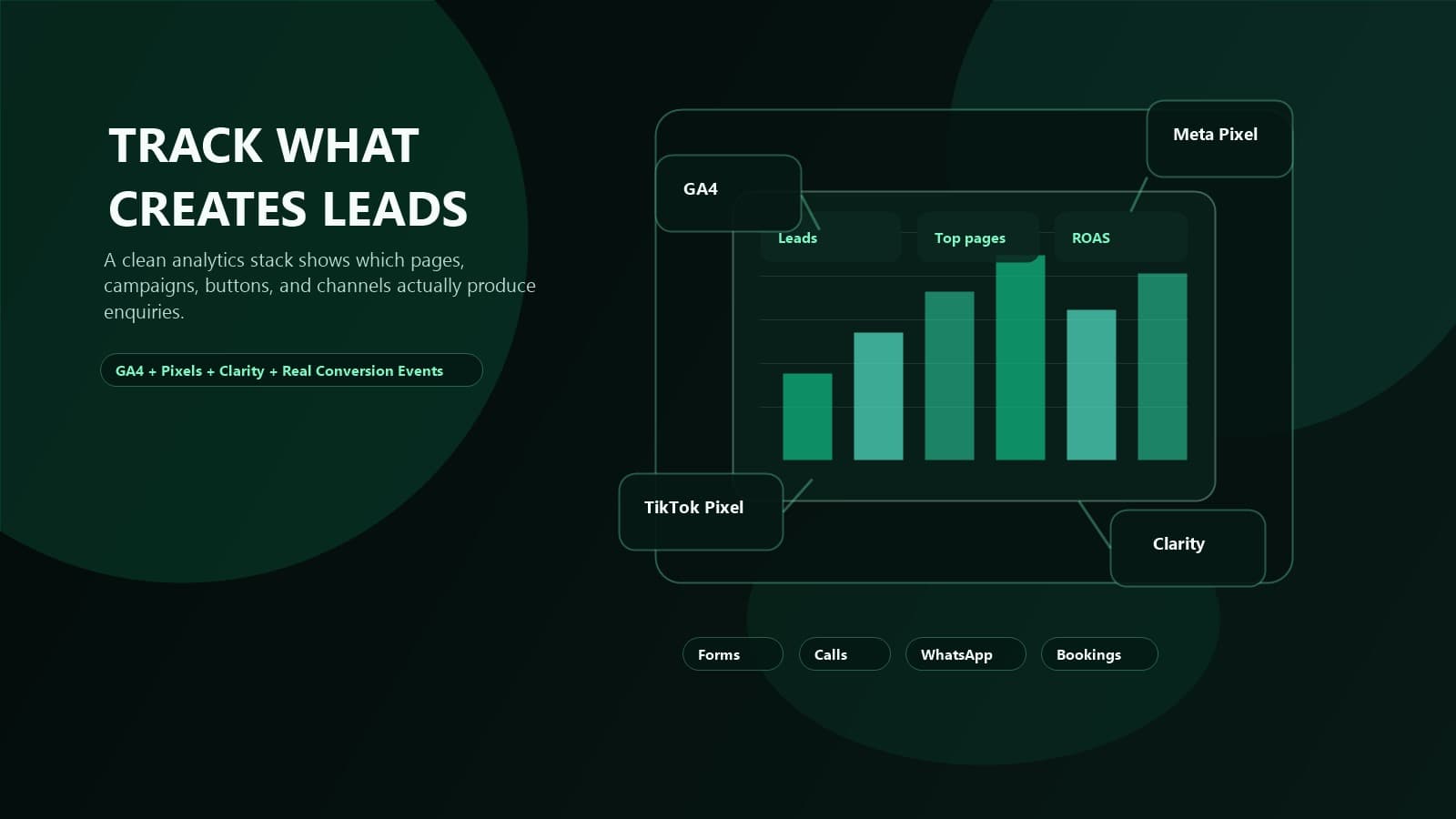
Article History
Published: February 26, 2026
Updated: July 13, 2026
Reviewed: July 13, 2026
Editorial Note
This guide describes a measurement design and QA workflow; it does not claim access to a reader's analytics account or guarantee attribution accuracy.
The setup is evaluated from business question to event definition, implementation, consent behavior, debugging, and reporting ownership.
Author
Founder, Web Growth
Founder-led strategist and developer focused on high-performance websites, conversion systems, and practical growth execution for service and ecommerce businesses.
- Next.js web architecture
- Conversion-focused website strategy
- Technical SEO foundations
- Website performance optimization
- Service-business growth systems
Key Takeaways
- Tracking should begin with business questions and named conversion events, not every available tag.
- Consent, duplicate-event prevention, and test traffic controls are part of measurement quality.
- A documented event dictionary makes reports easier to interpret and maintain.
What You Will Need
- The business questions your reports need to answer.
- A list of the conversions that matter (enquiries, calls, bookings, sales).
- Access to your site, tag manager, and analytics and advertising accounts.
Common Mistakes
- Installing every available tag before defining a single conversion.
- Letting test and internal traffic pollute production reports.
- Firing duplicate events so conversions are counted more than once.
Process Steps
- 1Define decisions, conversions, and required dimensions.
- 2Create an event dictionary with triggers and ownership.
- 3Implement the smallest required analytics and advertising tags.
- 4Test consent states, duplicates, referrals, and production events before reporting.
Academy lesson
Strategy, implementation notes, and decision support
Website Tracking Setup for Small Businesses
Most small business websites do not have an analytics problem.
They have a decision problem.
Traffic shows up.
Buttons get clicked.
Forms get submitted.
Ads keep spending.
But no one can answer the only question that matters:
Which pages, campaigns, and actions actually generate leads?
That is why basic analytics installs are not enough.
If Google Analytics 4 is installed but form submissions are not configured correctly, phone taps are invisible, WhatsApp clicks are ignored, and Meta Pixel or TikTok Pixel are firing duplicate events, your reporting is trash.
You do not need more dashboards.
You need clean tracking.
This is the tracking setup we recommend for small business websites that want better lead attribution, better ad optimization, and fewer expensive guesses.
If you want the faster done-for-you path, start with the analytics and tracking setup service.
What website tracking setup should a small business have?
Direct answer:
A small business website should track its real lead actions across Google Analytics 4, Microsoft Clarity, and any active ad platform pixels before spending harder on traffic.
For most service businesses, that means:
- GA4 for traffic source, landing page, session quality, and conversion reporting
- Meta Pixel for Meta ad attribution and optimization
- TikTok Pixel if you run TikTok campaigns or plan to
- Microsoft Clarity for heatmaps, rage clicks, dead clicks, and session replay patterns
- conversion events for forms, phone taps, WhatsApp clicks, booking clicks, and thank-you page views
- a weekly dashboard that shows lead volume by source, page, and campaign
That is the minimum viable stack.
Anything below that makes growth slower because every decision becomes a guess.
If your website still has deeper structural problems, pair this with a website audit before scaling traffic.
Why most website tracking setups fail
Most websites fail at tracking for one of four reasons.
1. GA4 is installed, but nothing useful is defined
Pageviews alone do not tell you whether the website is producing business outcomes.
2. Button clicks are tracked, but real lead completion is not
A click on a button is not the same as a qualified enquiry.
3. Ad pixels are present, but event names and triggers are inconsistent
This corrupts attribution and weakens campaign learning.
4. No one checks the setup after site edits, redesigns, or launch changes
Tracking breaks quietly all the time.
That is why tracking should be treated as infrastructure, not decoration.
The same way we check redirects, forms, and mobile layout during launch week, we also check tracking behavior. That is covered in more detail in the launch week checklist and first 7 days.
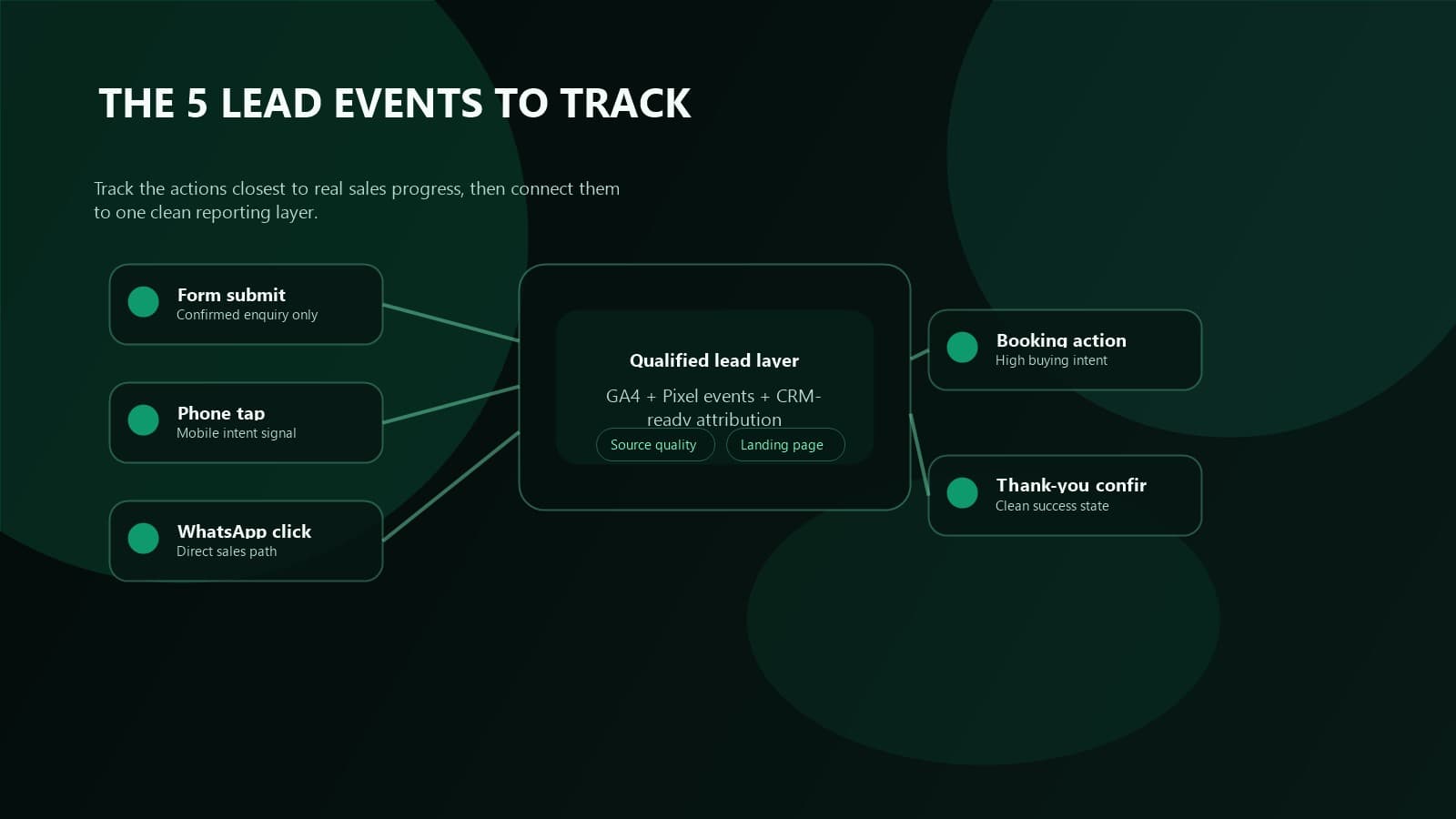
The 5 conversions every service business should track
Most service businesses do not need fifty events.
They need the right five.
1. Form submissions
Track every successful contact, quote, consultation, or audit request form submission.
2. Phone taps
If mobile users tap your phone number, that is buyer intent and should be measured.
3. WhatsApp clicks
For businesses in Nigeria especially, WhatsApp is often a real sales channel, not a side CTA.
4. Booking clicks or booking completions
If you use Calendly, TidyCal, or another scheduler, the booking journey needs its own event path.
5. Thank-you page or success-state conversion
This is your cleanest confirmation that the action completed successfully.
If you only track one part of the journey, you undercount leads.
If you track too many weak micro-events as conversions, you inflate performance and make your reports useless.
The goal is not more events.
The goal is clean decision data.
GA4 vs Meta Pixel vs TikTok Pixel vs Clarity
Each tool answers a different question.
Google Analytics 4
GA4 tells you where visitors came from, which pages they landed on, how they moved, and which sessions turned into measurable conversions.
Meta Pixel
Meta Pixel helps Meta understand which users completed meaningful actions so campaigns can optimize toward better leads instead of cheap clicks.
TikTok Pixel
TikTok Pixel does the same job for TikTok traffic and is especially useful if you run short-form video campaigns or retarget engaged visitors there.
Microsoft Clarity
Clarity shows what normal analytics misses: rage clicks, dead clicks, scroll behavior, broken expectations, and how users actually struggle on the page.
The real answer
GA4 measures.
Pixels optimize ads.
Clarity reveals behavior.
You need all three roles covered.
That is why this setup works better than relying on GA4 alone.
If your lead handling after the click is weak, connect this with the marketing automation build and implementation service so enquiries do not go cold after capture.
How to track form submissions correctly
This is where most websites lie to themselves.
They think they are tracking forms because they attached an event to a submit button.
That is weak tracking.
A real form conversion should only fire after a confirmed success state.
That can be:
- a dedicated thank-you page
- a successful server response
- a visible success message tied to a confirmed submission
Track the success.
Not the attempt.
If you only track button clicks, you will count failed submissions, validation errors, and spam attempts as leads.
That is fake performance.
If your website has multiple enquiry paths, break them out clearly:
- contact form
- quote request form
- audit request form
- lead magnet opt-in
That level of separation makes reporting far more useful.
How to track phone taps, WhatsApp clicks, and booking actions
These events matter because a lot of service businesses convert outside the traditional contact form.
For mobile-first businesses, they are often the main conversion path.
Track these actions individually:
- `tel:` phone taps
- WhatsApp click-outs
- booking widget opens
- booking confirmation page views
- email link clicks when email is a primary sales path
Why this matters:
- phone taps show urgency
- WhatsApp clicks show direct enquiry intent
- booking actions show stronger buying readiness than casual browsing
If you use appointment software, tie the setup into your website properly. That is exactly what the booking platform setup and integration service is for.
If the leads need routing and pipeline structure after capture, use the CRM system setup and configuration service.
👉 Track the action closest to real sales progress, not just the easiest button to instrument.
What Clarity shows that GA4 misses
GA4 tells you what happened.
Clarity helps you understand why it happened.
That distinction matters.
Example:
GA4 may show a high drop-off rate on a landing page.
Clarity may reveal that:
- users never notice the CTA
- a sticky button covers key text on mobile
- a form field breaks on smaller screens
- visitors keep clicking non-clickable design elements
- users stop scrolling before the proof section appears
This is why conversion optimization without behavioral visibility is half-blind.
If the page itself is weak, fix the page before buying more traffic. Start with the landing page design service or the homepage structure that converts visitors into customers guide.
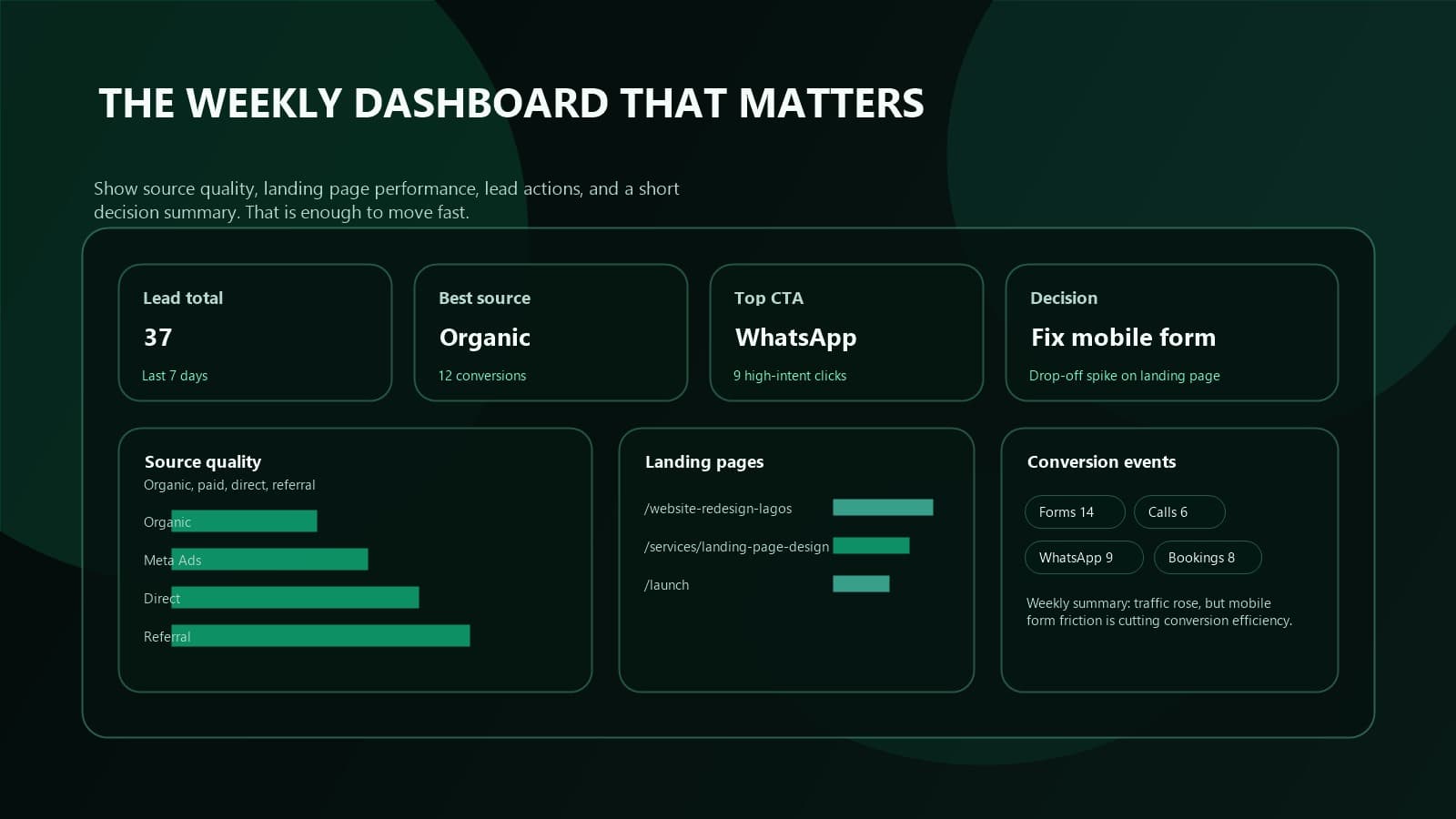
The simple dashboard a business owner actually needs
Most business owners do not need a complicated analytics warehouse.
They need one weekly view that answers:
- how many leads came in
- where those leads came from
- which landing pages produced them
- which campaigns influenced them
- which conversion paths are growing or breaking
That dashboard should include:
- sessions by source and medium
- conversions by source and medium
- top landing pages by conversion count
- form submissions by form type
- phone taps and WhatsApp clicks
- booking actions
- last 7 days vs previous 7 days
If you cannot read the dashboard in five minutes and know what to do next, it is too complicated.
A reporting system should speed up decisions.
Not create new homework.
Common tracking mistakes that destroy attribution
These are the failures we see most often.
Duplicate events
GA4 and pixels both fire, then a plugin fires the same event again.
Counting low-intent actions as primary conversions
Page scrolls, generic clicks, and weak engagement events should not be treated like real leads.
No unique success state
Without a confirmed success trigger, reports become inflated.
Broken tracking after redesigns or code edits
A site can look fine while its conversion layer is dead.
No UTM discipline on campaigns
Without campaign naming consistency, source reports get muddy fast.
No handoff between tracking and follow-up
If leads enter the site but not a real nurture system, revenue still leaks.
If your ad traffic is already expensive, these mistakes are not small.
They are budget leaks.
When to fix tracking before spending more on ads
Fix tracking first if any of these are true:
- you cannot say which channel generated your last five leads
- your ad platform and GA4 numbers never line up closely enough to trust
- your team reports leads manually from memory
- phone calls and WhatsApp enquiries are not counted anywhere
- you recently redesigned or migrated the website
- your booking flow lives on a third-party tool with no reliable tracking
If even two of those are true, your next ad spend increase is premature.
You do not scale confusion.
You fix measurement first.
That is also why a strong tracking setup supports better SEO decisions. Once you know which pages turn traffic into enquiries, you know what to push harder. Pair this with the small business website SEO checklist if search is part of the growth plan.
The tracking stack we recommend for most small business websites
For most service businesses, this is enough:
- 1GA4 installed cleanly
- 2Meta Pixel for Meta campaigns
- 3TikTok Pixel if TikTok is active
- 4Microsoft Clarity on key commercial pages
- 5conversion events for forms, phone taps, WhatsApp clicks, and bookings
- 6thank-you page or confirmed success-state tracking
- 7weekly QA after any site change
That setup gives you:
- cleaner reporting
- better campaign optimization
- more confidence in what to improve
- fewer wasted decisions
If you want us to handle the planning, event mapping, implementation, and QA, use the analytics and tracking setup service.
FAQ
Is GA4 enough on its own?
No. GA4 is essential, but it does not replace ad platform pixels or behavioral tools like Clarity if you want cleaner attribution and better conversion insight.
Should WhatsApp clicks count as conversions?
Yes, if WhatsApp is a real sales path for your business. For many Nigerian service businesses, it is one of the highest-intent actions on the site.
Do I need Google Tag Manager for this?
Not always. Some websites can track cleanly without it. What matters more is having a clear event plan, reliable triggers, and proper QA.
What is the biggest tracking mistake on small business websites?
Tracking button clicks instead of confirmed lead completion. That makes reports look better while decisions get worse.
Can you fix tracking without rebuilding the whole website?
Usually yes. In many cases, the tracking layer can be repaired or upgraded without a full redesign, as long as the site code and forms are accessible.
Clean tracking is not a luxury.
It is the difference between marketing that compounds and marketing that burns money politely.
If your website generates enquiries through forms, calls, WhatsApp, or bookings, the measurement layer should be strong enough to prove what is working.
Otherwise you are not optimizing.
You are guessing.
Related reads
- Why Your Website Is Not Getting Leads
- Launch Week Checklist and First 7 Days
- Homepage Structure That Converts Visitors Into Customers
- Analytics and Tracking Setup Service
Continue learning
FAQ
Website Tracking Setup for Small Businesses (GA4, Meta Pixel, TikTok Pixel, and Clarity) FAQ
Short answers to the planning, implementation, and decision questions readers usually ask next.
Start with one analytics tag (such as GA4) and named conversion events for your key actions. Add advertising pixels only for the channels you are actively running campaigns on.
Use internal-traffic filters or a test environment, verify events in a debug or preview mode before publishing, and exclude your own devices from production data.
Related Reads
Keep building context, not just page views
These Academy guides expand the same implementation path so readers can move from strategy to action without losing momentum.
Platform Selection
6 min read
Website Platform Comparison for Small Businesses
Compare WordPress, Shopify, Next.js, and builder-style platforms based on SEO, control, maintenance, growth stage, and conversion needs.
Copy Planning
5 min read
How to Plan Website Copy Before Hiring a Developer
Prepare a page-by-page copy pack that gives a developer real offers, proof, objections, and calls to action instead of placeholder text.
Website Strategy
4 min read
Namecheap for a Small Business: Domain, DNS, Email, and Hosting Decisions
Decide whether to use Namecheap for your domain, DNS, email, or hosting, and keep account ownership and migration options under control.
Website Strategy
6 min read
The Invisible Sales Rep: How to Close Leads Without a Single Phone Call
Most agencies chase leads. Growth Engineers build systems that nurture them automatically. Here is the full technical architecture for a 24/7 revenue machine.
Our articles are written and reviewed in-house using real website launch, redesign, technical SEO, and conversion work. We update posts when our process changes, and we keep the advice aligned with what we actually implement for businesses in Nigeria and remote international markets.
Internal Resource
Want the page built, not just planned?
Translate the strategy into page structure, offer hierarchy, proof placement, and clean conversion flow.
See Landing Page Service