

Local SEO for Small Businesses (Rank on Google Maps and Get Clients Without Ads)
If customers search ‘near me’ and don’t find you, you don’t exist. Learn how to rank on Google Maps, dominate local searches and generate consistent enquiries without paying for ads.
Search intent
Informational - improve search visibility with practical steps
Primary focus
local SEO for small business
Built for
Teams that need clearer website decisions before they spend.

Academy article
Victorious
Founder, Web Growth
Published
2026-02-09
Reviewed
2026-07-13
Best next move
Use this guide as the strategy layer, then bring in implementation support for redirects, metadata, content structure, and launch QA.
View SEO Service
Article History
Published: February 9, 2026
Updated: July 13, 2026
Reviewed: July 13, 2026
Editorial Note
Recommendations are aligned with Google Business Profile guidance and practical profile QA; universal conversion or ranking multipliers are intentionally excluded.
The guide separates eligibility and policy requirements from relevance, trust, website alignment, and ongoing measurement tasks.
Author
Founder, Web Growth
Founder-led strategist and developer focused on high-performance websites, conversion systems, and practical growth execution for service and ecommerce businesses.
- Next.js web architecture
- Conversion-focused website strategy
- Technical SEO foundations
- Website performance optimization
- Service-business growth systems
Key Takeaways
- Local visibility depends on relevance, distance, and prominence; no single profile edit guarantees rankings.
- Accurate categories, services, contact details, and landing pages help Google and customers understand the business.
- Reviews must be genuine, ungated, and treated as trust evidence rather than a ranking shortcut.
What You Will Need
- Current website URL and Search Console access.
- Primary target service and location intent list.
- Baseline traffic and enquiry quality snapshot.
Common Mistakes
- Targeting too many intents on one page.
- Publishing thin pages without practical depth.
- Ignoring internal linking between related guides.
Process Steps
- 1Confirm eligibility, ownership, categories, and business information.
- 2Align services, location context, photos, and the linked landing page.
- 3Create a compliant review-request and response process.
- 4Measure calls, directions, bookings, and Search Console visibility without assuming causation.
Academy lesson
Strategy, implementation notes, and decision support

Local SEO for Small Businesses
Here’s a harsh truth most businesses don’t want to hear.
If someone searches:
“web designer near me” “clinic near me” “salon near me”
…and you don’t show up…
You don’t exist.
Not “hard to find”.
Not “maybe later”.
Invisible.
Local search is brutally binary.
You’re either on page one…
or you’re forgotten.
There’s almost no middle.
The good news?
Local SEO is easier than global SEO.
Way easier.
Because you’re not competing with the whole internet.
You’re competing with 10 to 20 businesses in your area.
That’s a tiny battlefield.
Which means smart moves win fast.
Let’s break it down.
Start with the small business SEO checklist to cover the basics.
If you want this done for your business instead of piecing it together alone, see the Google My Business setup and optimisation service.
Why local SEO is insanely powerful
When someone searches locally, they’re not browsing.
They’re buying.
Think about the intent.
“Dentist near me” “plumber emergency” “web developer Lagos”
These people aren’t researching for fun.
They want help now.
Which means:
Higher intent Higher trust Higher conversions
Local searches often carry immediate intent because the person is looking for a nearby provider, but conversion rates vary by service, location, reputation, and the page reached. Measure calls, direction requests, bookings, and qualified enquiries instead of relying on a universal benchmark.
Less visitors.
More money.
That’s the dream.
How Google actually ranks local businesses
Most people guess.
Guessing is expensive.
Google uses 3 core factors.
Nothing magical.
1. Relevance
Do you match what they searched?
2. Distance
How close are you to the searcher?
3. Prominence
How trusted and well-known are you?
That’s it.
Everything you do feeds one of these.
If you optimize for these three, you win.
If you ignore them, you vanish.
Make sure your homepage converts that traffic with a homepage structure that converts.
And if your local visitors still hit a weak website after they click, use the website design in 48 hours offer to fix the conversion path fast.
Step 1: Create or fix your Google Business Profile
If you skip this step, stop reading.
Nothing else matters.
Your Google Business Profile (formerly Google My Business) is your weapon.
It’s what shows in Maps.
It’s what shows in the local 3-pack.
It’s what people click first.
Without it:
Zero rankings.
Zero calls.
Zero leads.
Set it up properly.
Fill everything.
Not half.
Everything.
What most people forget to fill
Businesses are lazy here.
Lazy = invisible.
Add:
- correct name
- real address
- phone number
- website
- business hours
- services
- categories
- description
- photos
- logo
Every blank field lowers trust.
Complete profiles rank better.
Always.
Step 2: Choose the right category
This part quietly controls everything.
Your primary category tells Google:
“This is what I am.”
If you choose wrong, you’re dead.
Example:
Web agency choosing “Consultant” instead of “Web Designer”.
Now Google doesn’t know what you do.
Ranking becomes harder.
Pick the most specific main category possible.
Specific beats broad.
Always.
Step 3: Add photos (lots of them)
This sounds silly.
It’s not.
Profiles with photos get:
More clicks More calls More trust
Because humans trust visuals.
Upload:
- office
- team
- workspace
- projects
- before/after
- exterior shots
- interior shots
Real photos.
Not stock.
Stock screams fake.
Fake kills trust.
Step 4: Get reviews (this is huge)
Reviews are rocket fuel.
Reviews can support prominence and help prospective customers judge a business, but review count alone does not determine local rankings. Relevance, distance, category choice, profile completeness, website signals, and the competitive market also matter.
Specific, recent reviews can reduce uncertainty for prospective customers. They should be earned through genuine service and must never be bought, fabricated, or selectively gated.
Both matter.
If you have:
3 reviews
And your competitor has:
83 reviews
Guess who wins?
Exactly.
How to get reviews without begging
Most businesses awkwardly say:
“Please leave a review.”
Nobody cares.
Instead:
Make it easy and automatic.
After every project:
Send:
“Thanks for working with us. If we helped you, a quick review really supports our small business. Here’s the link.”
Simple.
Polite.
Direct.
Do this consistently and reviews stack fast.
Respond to every review
Yes.
Every single one.
Good or bad.
Google sees activity.
Active profiles rank higher.
Also:
It shows humans you care.
Ignore reviews and you look dead.
Dead businesses don’t get calls.
Step 5: Build local citations
Citations sound complicated.
They’re not.
They’re just:
Your business name Address Phone number
Listed on other websites.
Examples:
- directories
- local listings
- business indexes
Google uses these to confirm you’re real.
More consistency = more trust.
Rule that most people mess up
Your details must match EXACTLY.
Not:
Street vs St. Phone with spaces vs without
Exact.
Google hates inconsistency.
Inconsistent info lowers rankings.
Be obsessive.
Step 6: Create local pages on your website
Most small businesses only have:
Home About Contact
That’s weak.
Create pages like:
Web Design in Lagos Web Design in Ikeja Web Design in Victoria Island
Each page targets one area.
Now you rank for multiple neighborhoods.
More hooks in the water.
More fish caught.
Example structure
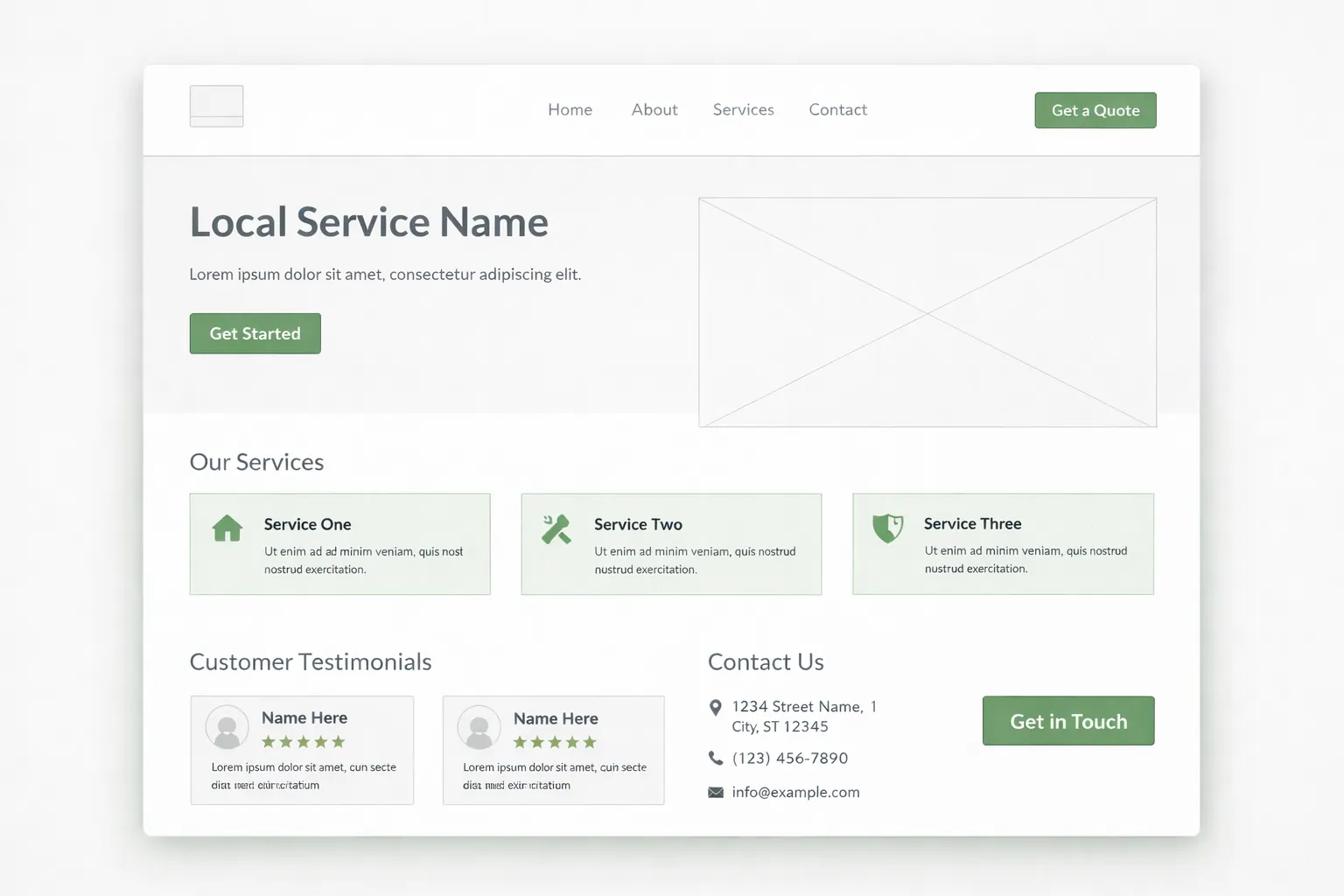
Each page should have:
- clear headline
- services
- testimonials
- photos
- FAQs
- call to action
- embedded map
Make it useful.
Not copy-paste spam.
Google is smarter now.
Step 7: Write local content
Content helps Google understand relevance.
Ideas:
- “Best clinics in Ikeja”
- “How to choose a web designer in Lagos”
- “Cost of building a website in Nigeria”
Local keywords = local rankings.
You don’t need 200 posts.
Just consistent helpful content.
Quality beats quantity.
Step 8: Get backlinks locally
Links still matter.
But don’t chase global links.
Chase local ones.
Examples:
- partner businesses
- local blogs
- chambers of commerce
- sponsorships
- events
- associations
Local links send strong trust signals.
Ten local links beat 100 random links.
Every time.
Step 9: Add schema markup
This is nerdy but powerful.
Schema is structured data.
It tells Google:
“This is our address” “This is our phone” “These are our hours”
It removes guesswork.
More clarity = better rankings.
Small technical tweak.
Big impact.
Common mistakes killing rankings
Avoid these:
- fake addresses
- keyword stuffing
- buying reviews
- ignoring reviews
- inconsistent info
- zero photos
- empty profiles
Shortcuts backfire.
Always.
Local SEO rewards boring consistency.
Not hacks.
Timeline reality check
This isn’t instant.
But it’s fast compared to normal SEO.
Typical:
Week 1 → setup Week 2 → citations Week 3 → reviews Week 4-6 → rankings improve
Within 1 to 2 months you often see calls increasing.
Not magic.
Just momentum.
Why this beats ads
Ads stop when money stops.
SEO keeps sending leads forever.
Ads = renting SEO = owning
Ownership always wins long term.
Use ads if you want speed.
Use SEO if you want stability.
Smart businesses use both.
But SEO first.
Always.
If traffic isn't turning into enquiries, read Why Your Website Isn't Getting Leads.
And make sure the foundation is solid with the best hosting guide.
If you want implementation support beyond the checklist, the search engine optimisation service is the next step.
Final thought
If you rely only on referrals, you’re gambling.
If you rely only on ads, you’re renting.
But if you rank locally?
You become the obvious choice.
Every day.
Automatically.
No chasing.
No begging.
If you want this handled for you, request a quote.
Related reads
- Why Your Website Isn’t Getting Leads
- Speed Checklist That Improves Rankings
- Homepage Structure That Converts
Just steady inbound enquiries.
Local SEO is not flashy.
It’s quiet.
Boring.
Predictable.
And boring predictable systems build real businesses.
Continue learning
FAQ
Local SEO for Small Businesses (Rank on Google Maps and Get Clients Without Ads) FAQ
Short answers to the planning, implementation, and decision questions readers usually ask next.
Initial signals can appear in weeks, but stable ranking and lead-quality gains usually need sustained updates over months.
Sometimes for narrow intent, but most businesses need multiple high-quality pages mapped to real search demand.
Related Reads
Keep building context, not just page views
These Academy guides expand the same implementation path so readers can move from strategy to action without losing momentum.
Local SEO
5 min read
Google Business Profile Optimization Checklist
Audit an existing Google Business Profile for category accuracy, customer information, proof, enquiries, and ongoing maintenance.
SEO Strategy
5 min read
Small Business SEO Checklist: 12 Checks Before You Publish More Content
Use this 12-point checklist to find crawl, page-intent, local visibility, internal-linking, and conversion problems before publishing more content.
Email Marketing
5 min read
Email Marketing for Small Business: Build a Useful First System
Plan a permission-based signup, welcome sequence, sending rhythm, and measurement system tied to real customer decisions.
Lead Generation
5 min read
Why Your Website Is Not Getting Leads, and What to Fix First
Find out why your website is not getting leads and which trust, clarity, speed, CTA, mobile, or enquiry-flow issues to fix first.
Our articles are written and reviewed in-house using real website launch, redesign, technical SEO, and conversion work. We update posts when our process changes, and we keep the advice aligned with what we actually implement for businesses in Nigeria and remote international markets.
Internal Resource
Planning a higher-stakes SEO move?
Use this guide as the strategy layer, then bring in implementation support for redirects, metadata, content structure, and launch QA.
View SEO Service